Buddy Manual

Preparing for Day One

1.1 Write the Welcome Email

This is a guide for the buddy (supporter) on how to prepare to welcome the new hire.

Before the new hire's first day, it's essential to initiate communication and set a welcoming tone. 

Approximately five days before their start date, reach out to the manager to obtain the new hire's email address. In the email, introduce yourself and provide details about where and when you'll meet on their first day, ensuring clarity and alleviating any initial uncertainties. 

By initiating communication early on, we lay the groundwork for a successful onboarding journey, fostering a sense of belonging and ease for the new hire as they embark on this exciting chapter with us.

1.2 Preparing the Desk for the New Hire

Ensure that the new hire's workspace is set up and welcoming before their arrival. This includes organizing their desk, providing necessary supplies, and ensuring that any required technology is ready for use.

These include:

  • Unicorn balloons, stickers, water bottle, Umbraco clothes - you should have received an email from Marie regarding where these should be supplied, otherwise ask her about it. 

  • Laptop, mouse, keyboard, headphones: if Mathias did not place them already, make sure to ask him about those. 

1.3 Checking Breakfast Order for the First Day

Confirm that breakfast arrangements have been made for the new hire's first day, to make sure we provide a warm welcome with a well-prepared breakfast that sets a positive tone for the start of their journey with us. 

Please check this up with either Marie or your Prathees. Usually Prathees books breakfast (For the buddies and the new hires).

1.4 Scheduling Weekly 1:1 Meetings or Buddy standup

Create a recurring Google Calendar event for weekly one-on-one meetings between the new hires and their buddies.

This should take place only in the first 3 months.

Schedule these meetings for Friday mornings, typically lasting 30 minutes, to allow sufficient time for discussing challenges, stressors, mentorship, feedback, and goal setting.

Setting up these regular meetings ensures consistent support and guidance throughout the new hires' onboarding process.

Check list

  1. Write the welcome email

  2. Preparing the desk for the new hire

  3. Check breakfast order for the first day

  4. Schedule weekly 1:1 meetings

Day One

Breakfast with the new colleagues

Introduce the new colleague to the team

Setup laptop/desk, Keyboard+Mouse

Show them the onboarding document and make a personalized copy for each new hire

Let the new guys share the onboarding plan with their buddies

Install programs

Programs that need installation:

  1. Fork: LINK

  2. SQL Server Management Studio: LINK 

  3. Azure Data Studio: LINK for MAC users.

  4. Visual Studio: Choose Free download: LINK

  5. Rider: LINK for MAC users.

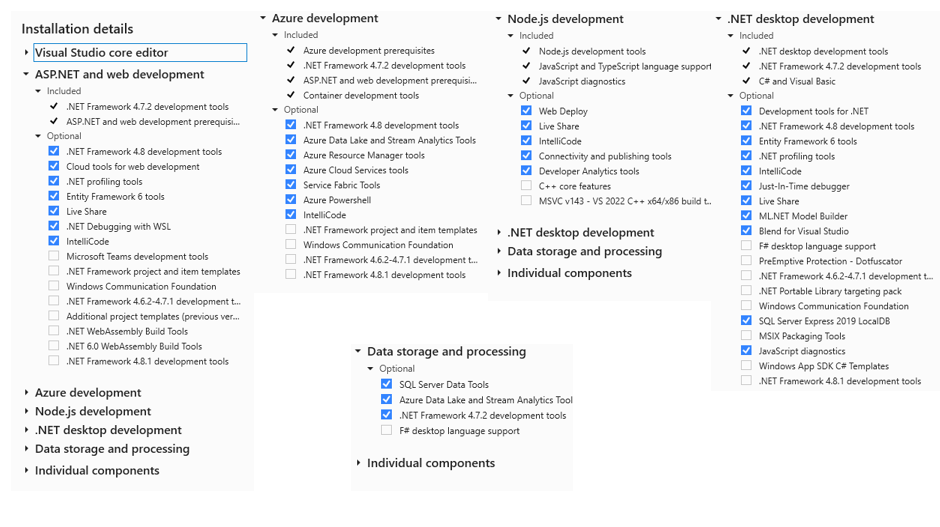
Make sure you have the following checked for Visual Studio.
(Maybe check with MAC Users what you need for Rider)

Invited to the channels

Main Communication: Our primary communication happens on Slack. It’s essential to check Slack regularly throughout the day to stay informed about important updates and respond quickly to any issues or announcements.

Key Channels:

  • intercom-sla: Notifies you when a ticket's SLA is about to expire or has expired. If a colleague reacts, they've taken the ticket. If not, and you have time, pick it up to respond within the SLA window.

  • cx-support: Main communication channel for the support team.

  • cx-general: For communication across the entire Umbraco CX (customer experience) team, including departments like documentation, training, and customer success.

  • general: Company-wide communication channel.

  • swat-support-procedure-and-updates: Updates on any changes to procedures.

  • project-monitoring: Shows failed project creations and the reasons behind them. 

Department and Team Channels:

  • ask-fishtank: For questions or communication with the accounting department (e.g., about invoices).

  • brass-balls: Updates about Umbraco sales - showing the money charged for various products and deals.

  • cloud-group-releases: News about Umbraco Cloud releases.

  • coma-campaigns: For marketing inquiries or issues with marketing materials.

  • dev-demo: Where the D-Team shares work demos.

  • documentation-ama: For any documentation-related questions.

  • invoice: for any invoice requests (licenses, cloud subscriptions that must  be paid by invoice etc.)

  • webdevelopment: for any issues on umbraco.com

  • licensing-commercial-products: Suits or other people might request product licenses, always keep an eye and help if you can. (mostly creating, changing or deleting product licenses)

Fun Channels:

  • dog_happiness: Share pictures of your dog or enjoy others' dog photos.

  • kittens: A channel for sharing non-work-related content.

  • padel: For communication about padel.

Support and Product Channels:

  • pe-support: Post here if a site is down so the BlackOps team is alerted.

  • sre-issues-and-requests: For hostnames, WAF, TXT records, Cloudflare, Azure-related issues/questions.

  • pe-updates: D-Team shares product updates, features, and bug fixes with CX.

  • sre-ddos-alerts: Alerts about DDoS attacks for specific customers.

  • support-umbraco-cloud: Ask questions about Umbraco Cloud and get help from the Cloud team.

  • swat-growth-channel: The Growth team will help with any questions, like ticket classification or customer issues.

  • cx-support-lvl1: For support-related questions directed to your SWAT teammates.

  • cx-suits: A support channel that connects Suits (sales) and Support. For requests from both sides.

  • atlas-experts: For credit card payments in the Umbraco Cloud shop, issues/requests/questions (anything related to payment that is technical)

Product-Specific Channels:

  • umbraco-cloud: Ask about anything related to Umbraco Cloud features and questions - it is not meant for issues (that is for the support-umbraco-cloud channel instead)

  • umbraco-cms: For questions/issues related directly to Umbraco CMS.

  • umbraco-commerce-support: Support for Umbraco Commerce.

  • umbraco-deploy: Questions about Umbraco Deploy.

  • umbraco-forms: For any questions related to Umbraco Forms.

  • umbraco-heartcore: Support for Umbraco Heartcore.

  • umbraco-uibuilder-support: For questions about Umbraco UI Builder.

  • umbraco-workflow: For questions about Umbraco Workflow.

  • engage-support: For questions about Umbraco Engage.

Miscellaneous Channels:

  • trainingregistration: Assign names and emails for training dates.

  • odense-meetup: Tech-related events in Odense, such as TED talks.

  • support-leads: See when a sales lead is created.

  • umbraco-refunds: Contact accounting for customer refunds.

  • uc-backups: Notifications about backup creation or restoration failures.

  • uc-business-flows: See updates about project creations or deletions.

  • uc-provisioning: Changes like adding/removing environments or upgrading projects.

  • uc-autoupgrade: Info on projects that have been auto-upgraded.

  • umbraco-dk: For anything Danish HQ office related

  • umbraco-dk-food: lunch + announcements of cake or icecream etc.

Activated via Umbraco ID // Remember to give the correct roles in User roles (Only admin)

Setup Cluster project

Go on https://www.s1.umbraco.io/projects and create a project. 

Then go to https://www.s1.umbraco.io/project/your-project-name/support

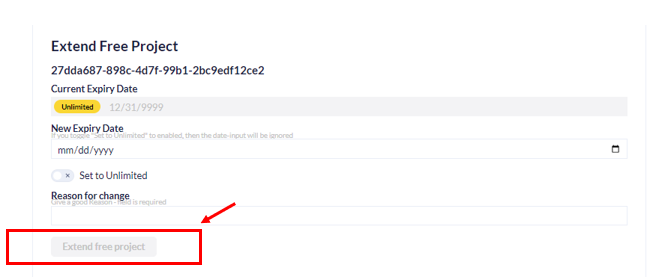
Set the project to unlimited:

Warning

Do not forget to add the reason for the change as this will allow you to click on the Extend free project button.

Workforce management platform

In the first day, you will be presented and become familiarized with our internal workforce management platforms Assembled as well as Zenergy

If you cannot access one or both of the platforms, please check your email for an invitation from Mathias. He should have already sent you the invitations.


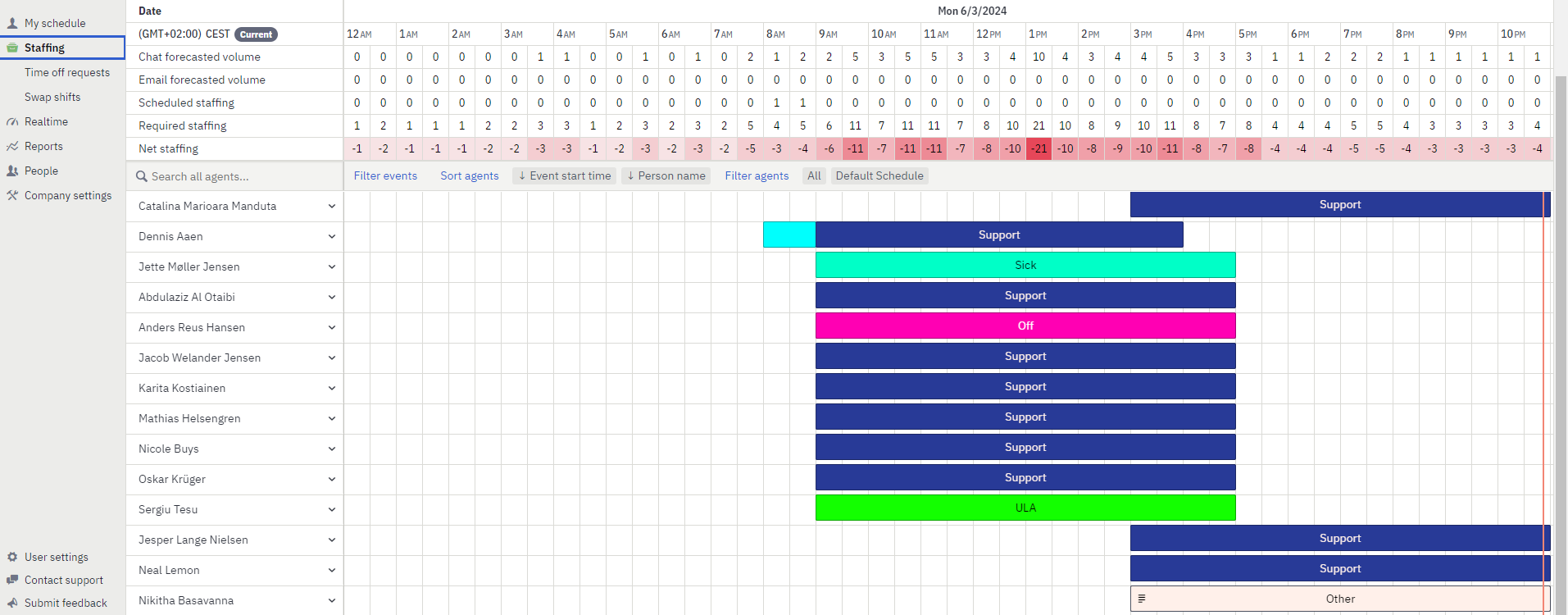
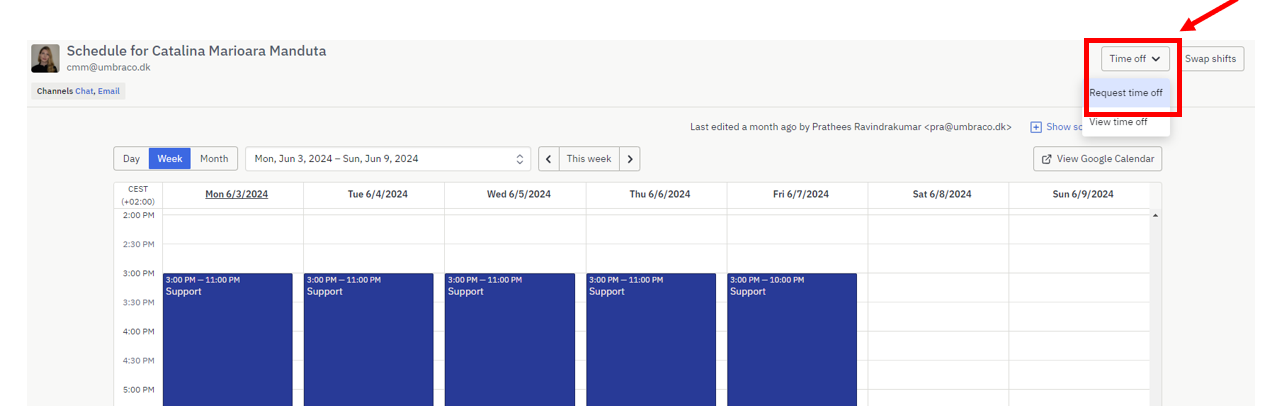
On Assembled, you can view your schedule, see your colleagues’ schedules, and request time off. You can navigate using the options in the upper right corner.

You will primarily use the staffing section, where you can see the number of people working on a particular day, who is sick, off, or engaged in activities not related to support. This information is important for assigning tickets, which you will learn about later.

Time off

If you require time off, click on the "Time Off" button in the upper left corner. A new window will pop up where you'll need to fill out the type of time off, the time periods, and the person to send the request to. Choose your manager as the recipient of the request. The options for the type of time off include Child Care Day, Off, and Tiger Off.

Note

Omsorgsdag (Child Care Day): This is a designated day off for employees to take care of their children. Omsorgsdag allows parents to attend to their children's needs, whether it's for medical appointments, school events, or simply spending quality time together.

Tiger hours: Any overtime worked will be recorded as Tiger Hours, which can be redeemed for additional days off later. 

Zenergy

Zenergy is the platform where we check our payslips (salary) as well as where we declare Holiday & Absence days.

To register a holiday in Zenergy.

  1. Click on "Holiday and Absence."

  2. Click on Holiday.

  3. Click on the + sign

  4. Fill out the pop-up window and click "Save."

To register a sick day in Zenergy, you have to:

  1. Click on "Holiday and Absence."

  2. Click on "Absence."

  3. Click the + button

  4. Fill out the pop-up window and click "Save."

Setup Intercom

We use Intercom to manage and respond to support tickets. If Intercom has not been set up for you yet, please contact your manager to request this setup. They will handle the necessary configurations to ensure you have the appropriate access.

After your access has been sorted out, make sure to setup the Intercom view (Team inbox, Teammates, Conversation attributes, Company details, User Data, Recent conversations, Recent page views, User notes) exactly like your buddy (supporter) has set it up.

Grammarly

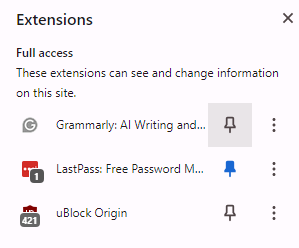
As it is important that we keep the communications as correct grammatically as possible, you will have to install Grammarly to your Chrome browser and pin it to your Intercom. 

You do this by following the link:

https://www.grammarly.com/browser/chrome

Press the Add to Chrome button followed by Add extension. Finally, go to your Intercom and enable Grammarly there:

Checker Plus for Gmail (Chrome extension)

As making a habit of checking your emails is important, here we will add also the Checker Plus for Gmail to your Chrome extension. 

Follow the same steps in order to add checker plus for Gmail. Acces this link. And follow the same steps mentioned above, Press Add to Chrome button, followed by Add extension. Go to your Broweser and pin it to your browser. 

Get the key

To access the office, you will need either a key or an access code, which you can obtain from Fishtank. Niels Peter is currently responsible for this. He will also introduce you to the alarm system. Additionally, you can review our internal documentation on how to enable and disable the alarm by clicking here

Note

To access the link, please ensure you have an account on Umcyclopedia. If you don't yet have an account, check your email for an invitation from our IT department.

If you haven't received an invitation, feel free to reach out to Mathias or any member of the IT department for assistance. They will be happy to help you gain access.

Office Tour

Your buddy will show you around where you can find the Toilets, Canteen, Lunch, Basement, and how to use the Elevator.

Support Documentation platform

You will be introduced to one of our best information sources, called the Internal Documentation Platform here

The platform has a lot of articles written by supporters, ranging from how to approach issues to step-by-step guides on solving them.

There's a lot of information there, so make sure to always use it.

Staff sheet

Show the CX staff sheet this contains information about the staff tiger hours, phone line, mostly.

Introduction video

Create an introduction video of your (new colleague) self-video and post it in general.
Make it short and nice, a bit about of who you are, which department have you started in, hobbies etc, be excited.

Onboarding document

Onboarding Document

This will be a guide and a book that will contain most of the things you need to know to succeed in support.

You can call it the holy bible of support.

It’s a document for both you, as a new member of our team as well as for your buddy to know what to go through.

You both must make sure that the document topics have been discussed, and it’s your responsibility to remember and come back to it.

It will provide you a whole overview of how things are working in CX support.

!Disclaimer: while it is a huge source of information, there will be a lot of other things on top of this; however, this will lay the best foundation for a new person to start working in Umbraco Support.


Note

NOTE!

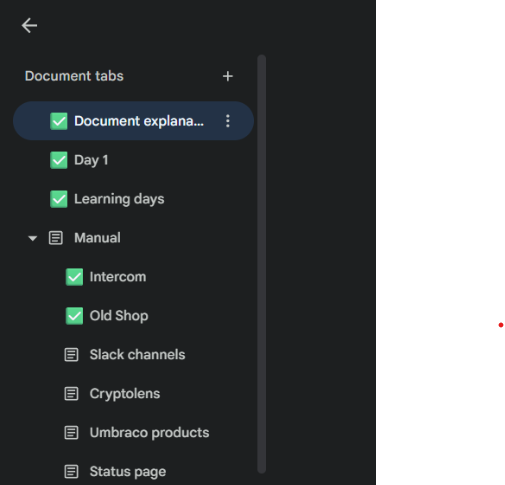
It is important to use this document and consider it like a “holy document” therefore, please make sure that whenever you have completed something to add the checkmark on the right side of the tabs like this:

The first 3 months

1. General

These structured articles, together with the full onboarding document, provides a roadmap for both the new hire and their buddy, offering clarity on what to expect throughout the initial three months. 

Handling Start Dates: If the new hire starts in the middle of the week, adjust the schedule accordingly. For instance, if they start on a Wednesday, their Week 1 would begin on that day, and you can continue with the schedule as outlined, ensuring they cover the necessary topics within the timeframe of their first week.

Placing Intercom Training: To ensure Intercom training always occurs at the end of the week, schedule it consistently on Fridays. This way, regardless of when the new hire starts, they can anticipate that Intercom training will occur at the end of each week.

Organizing Overview: Provide the new hire with an overview that outlines the schedule for each week, indicating the topics to be covered and the consistent placement of Intercom training on Fridays. This overview helps them understand the structure of their onboarding process and what to expect each week.

2. Umbraco Training

You'll engage in Umbraco training sessions alongside communication courses. These training opportunities will enhance your technical prowess, while the communication training provided by Kjellerup Kommunikation will refine your written and verbal communication skills.

You'll begin with Fundamentals before advancing to Cloud Developer. For further details, you can find additional information here regarding Umbraco Training.

3. Additional Training

Besides the courses available on our training platform, you will get the opportunity to use extra time in learning different other subjects. 

Youtube tutorials

In the first month you will have the chance to follow 3 different courses on youtube: C#, ASP NET 6.0 and Entity Framework Core, and ASP.NET MVC. You will receive certain days in which you can follow each of the above mentioned courses. 

As part of a great culture in support, the main things you'll get to learn from your buddy and people around - make sure to always be curious and ask questions to anyone, not only your buddy, you'll get exactly what you need to be successful in support by doing that.

4. Communication Training with Jacob Kjellerup

You will have the opportunity to join a series of five dynamic communication courses led by Jacob Kjellerup. These workshops are designed to enhance your communication skills in various aspects of professional and personal interactions. Here's what you can expect:


1. Word Engineering

Dive into the mechanics of effective communication. In this workshop, you will explore:

How Communication Works: Understand the fundamental principles of how we convey and interpret messages.

Positive Communication: Learn techniques to ensure your communication remains positive, and recognize common pitfalls to avoid.

Assertive Communication: Master the art of owning the dialogue in a positive and constructive manner.


2. NASA (Need, Acceptance, Solution, Acceptance)

This workshop introduces the NASA model, a powerful tool to:

Avoid Misunderstandings: Clear up confusion and ensure your message is understood as intended.

Show Interest and Get to the Point Quicker: Engage effectively and communicate concisely.

Sell More: Enhance your persuasion skills—after all, everyone is in sales to some extent.


3. CASA (Critical Reading, Acknowledgement, Summarize, Answer/Ask)

Develop your critical reading and conversational skills with the CASA approach. This course will help you:

Critical Reading: Improve your ability to analyze and understand written material.

Acknowledgement: Learn to recognize and validate others' perspectives.

Summarize and Answer/Ask: Communicate more effectively by summarizing discussions and asking pertinent questions.


4. Conversational Judo

Conflicts are a natural part of life, but handling them constructively is key. In this workshop, you will:

De-escalate Conflicts: Use tried-and-tested tools to manage and reduce tensions.

Constructive Conversations: Decide whether to engage in a conflict or elevate the discussion to a more productive level.


5. Why, What, How

Capture and maintain your audience’s attention with this special approach. This workshop will teach you how to:

Communicate Relevance: Make sure people understand what will happen, why it matters to them, and what actions are needed.

Ensure Retention: Deliver your message in a way that ensures it sticks.

These courses promise to equip you with valuable communication skills that will benefit you both professionally and personally.
Note

Additionally, there will be two online sessions each month focused on customer interaction with Jacob Kjellerup. During these sessions, you can ask questions about specific issues you’ve encountered in your communications or discuss areas where you'd like to improve.

5. Cluster project - when and what it involves

A cluster project is a side project you will have to create during your internship/training period.

It will require you to use your skills in web development and some C# logic as well.


One of the supporters will concur to a weekly meeting where we will go through your progress and you will have the chance to discuss and spar with your results, findings, and ideas.

Feel free to ask your buddy for assistance or another of your teammates.